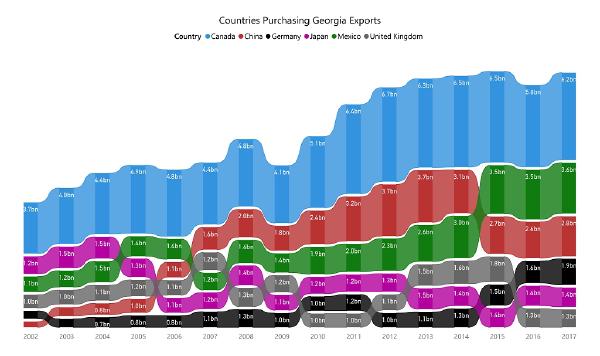
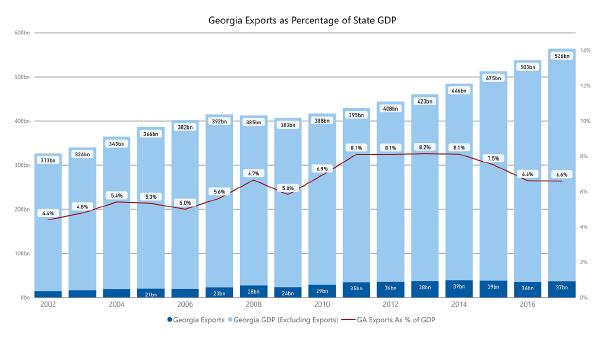
Export goods originating from Georgia reached an all-time high-mark of $39.4 billion in 2014. As a state, Georgia has been trying to exceed that banner year ever since. Recent talk of tariffs and revisions to NAFTA have caused many Georgians to wonder what effect this may have on our economy. We will have to wait until February 2019 for the US Census Bureau to publish complete 2018 export totals. But currently available data can help us understand the role that exports have in Georgia’s economy and what countries dominate as our trade partners. In 2017, Georgia’s export economy was the 12th largest of the 50 states. Over 15 years’ time, the dollar-value of goods originating from Georgia and sold abroad has grown 2.5 times. In 2002 exports totaled $14.4 billion. By 2017 they had grown to $37.2 billion.
Our company is interested in exporting our products. What data sources are available and how can we evaluate our prospects?
The U.S. Census Bureau has a wealth of information for evaluating both domestic and international markets. In this series of blog articles, I’ve documented the methods for retrieving Census export data and analyzing it in Power BI. Topics include: the product classifications used by the Census, the mechanics for retrieval and how Power BI and the Tabular data model can make quick work of a 5 million row data set. Viewed in aggregate, you can see that exports have an important and growing role in our state’s economy (graph below.) That data really comes alive when you can drill down and explore data trends in your own industry.
In an earlier post I showed you a Power BI interface for summarizing Georgia export data from the US Census Bureau. If your primary interest is year totals, that model is useful for understanding our State’s export economy. But there are some questions that particular Power BI model does not answer. In particular, it does not address change over time questions like: What product categories have the greatest gain or loss? What countries were responsible for those gains and losses? This blog article and an accompanying video explain how the updated version of our Power BI model address these questions. The video takes you step-by-step through the system. The paragraphs and images below are a quick orientation for you. Note: clicking the images will increase their size.
Describing Export Statistics using Power BI # You may already know that Exports from Georgia contribute between $35-40 billion to our state economy each year. But have you ever wondered – What do these Georgia products look like? This blog article and attached video is an effort to answer that question. It uses a free tool from Microsoft called Power BI to slice and dice the detailed monthly export data that is available from the US Census. What Does the Power BI Tool Show? # I’ve previously retrieved this Census data for 2013-2018 and ended up with a 2.4 million row data set in SQL Server. While it is all well and good to have the raw data - the trick is putting that data in a format end users can easily navigate and learn from. On this score, PowerBI delivers.
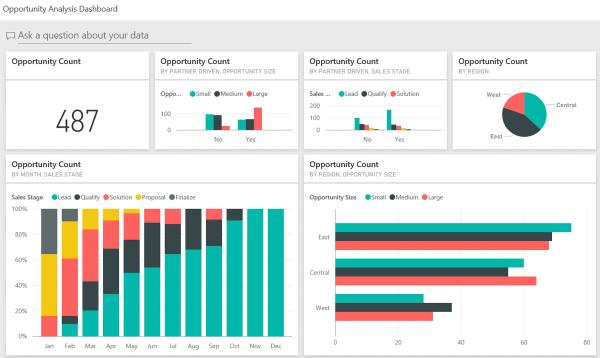
The course “Analyzing and Visualizing Data with PowerBI” is devoted to showing the capabilities of this Microsoft tool. For those who have worked previously with Excel, Microsoft Access or SQL Server Reporting Services – the video demonstration of PowerBI capabilities will cause you to repeatedly think “wow – that is slick.” As an example, pictured below is one of the dashboards created as part of the course.
Analyzing and Visualizing Data with PowerBI # The course is composed of approximately 120 videos whose duration varies from 1-5 minutes. There are 4 different people presenting and the video content is quite good. The pace of content is well measured and the videos nicely support the lab materials. This is a really enjoyable course outlining capabilities of an innovative tool.